> For the complete documentation index, see [llms.txt](https://documentation.madonnestudio.com/llms.txt). Markdown versions of documentation pages are available by appending `.md` to page URLs; this page is available as [Markdown](https://documentation.madonnestudio.com/free-scripts/delete-gun/installation.md).

# Installation

## 📋 Requirements

Before installing Delete Gun, make sure you have the following:

* A **FiveM server** running on artifact `2699` or above
* *(Optional)* `es_extended` if using the ESX framework
* *(Optional)* `ox_inventory` if using ESX + ox inventory
* *(Optional)* `MS_MadonnAdmin` if using MadonnAdmin for permissions

***

## ⬇️ Step 1 — Download the resource

Download the latest version of **MS\_Delete\_Gun** from the [CFX Portal](https://portal.cfx.re/), the official Cfx.re platform for downloading your purchased resources.

> 💡 You must be logged in with the account used to purchase the resource.

***

## 📁 Step 2 — Add to your server

Copy the `MS_Delete_Gun` folder into your server's **resources directory**.

```
your-server/
└── resources/
    └── MS_Delete_Gun/
        ├── config/
        ├── customs/
        ├── framework/
        ├── main/
        └── fxmanifest.lua
```

***

## 📝 Step 3 — Add to server.cfg

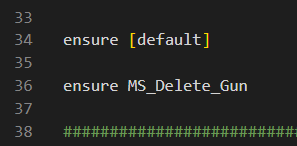
Add the following line to your `server.cfg`, **after** any dependency resources (ESX, ox\_inventory, MS\_MadonnAdmin):

```cfg
ensure MS_Delete_Gun
```

> ⚠️ Make sure `MS_Delete_Gun` is started **after** any framework or inventory resource it depends on.

***

## ⚙️ Step 4 — Configure the resource

Open `config/main.lua` and configure the resource to match your server setup.

Refer to the [⚙️ Configuration](/free-scripts/delete-gun/configuration.md) page for a full breakdown of every option.

***

## 🔐 Step 5 — Set up permissions

Depending on the permission system you chose, you will need to grant access to your staff members.

### ACE Permissions *(default)*

Add the following to your `server.cfg` for each admin group or player you want to grant access to:

```cfg
add_ace group.admin madonne.deletegun allow
```

> The permission name `madonne.deletegun` can be changed in `customs/perms.lua`.

### MadonnAdmin

If `MADONNADMIN` is set to `true` or `auto` and MS\_MadonnAdmin is running, permissions are handled automatically based on staff rank. No additional configuration needed.

### Custom Permission System

Edit `customs/perms.lua` and implement your own logic inside the `GetPerms` function:

```lua
function GetPerms(src)
    -- Your custom permission check here
    -- return true to grant access, false to deny
    return false
end
```

***

## 🔄 Step 6 — Restart your server

Restart your server or run the following command in the console:

```
refresh
start MS_Delete_Gun
```

Your Delete Gun is now ready to use! ✅