> For the complete documentation index, see [llms.txt](https://documentation.madonnestudio.com/llms.txt). Markdown versions of documentation pages are available by appending `.md` to page URLs; this page is available as [Markdown](https://documentation.madonnestudio.com/paid-scripts/madonnedoj/configuration/permissions-system.md).
# Permissions System
## Overview
The mg-dojscript permission system allows granular access control for each service. It uses a **bit flags** system to optimize storage and permission checks.
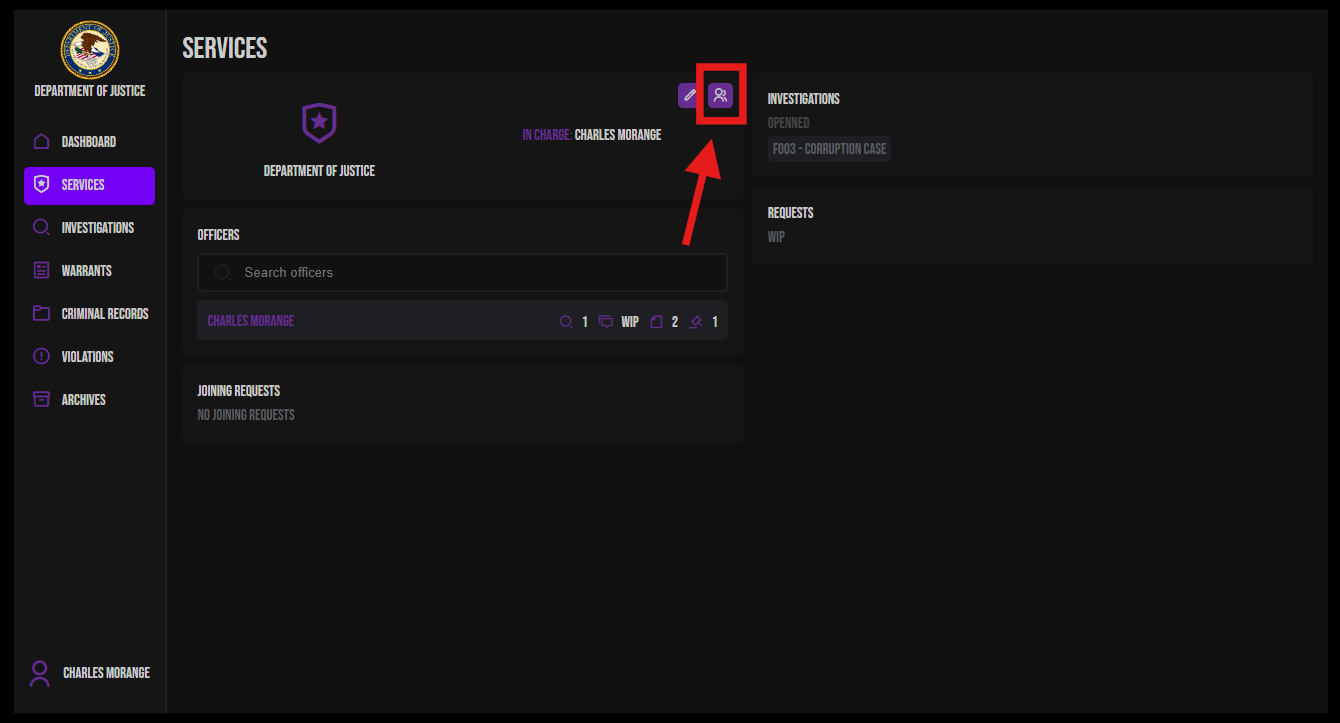
## Accessing the Permissions Page
The permissions management page is accessible via:
* Open your service page
* Click on role management button
## Available Permissions List
The system has **10 distinct permissions**:
| Permission | Description |
| --------------------- | ----------------------------------------------- |
| `MANAGE_FOLDERS` | Create and edit investigations |
| `MANAGE_DOCUMENTS` | Create and edit documents |
| `MANAGE_WARRANTS` | Create and edit warrants |
| `ISSUE_WARRANTS` | Issue/send warrants (Justice only) |
| `MANAGE_EXAMINATIONS` | Create and edit examinations |
| `MANAGE_REQUESTS` | Manage requests (currently disabled) |
| `MANAGE_RECORDS` | Edit criminal records |
| `MANAGE_SERVICES` | Manage membership requests and service settings |
| `MANAGE_VIOLATIONS` | Create and edit violations |
| `ARCHIVE_FOLDERS` | Archive investigations (Justice only) |
{% hint style="danger" %}
DON'T FORGET TO SAVE
{% endhint %}
## Management Interface
### Features
#### 1. Adding Roles
* Maximum **6 custom roles** per service
* The `USER` role is permanent and cannot be deleted
* Unique name validation
#### 2. Editing Roles
* Rename existing roles (except `USER`)
* Modify permissions via checkboxes
* Deletion possible (except `USER`)
#### 3. Permission Management
* Table interface with:
* **Rows**: List of 10 permissions
* **Columns**: Service roles
* Checkboxes to enable/disable each permission
#### 4. Smart Save
During save:
**a) Automatic User Synchronization**
* Users whose role was deleted are demoted to `USER` role
* Users keep their role if it still exists
* Automatic update of permission values if modified
**b) Service Chiefs Update**
* Chiefs automatically receive the **highest role** (highest permission value)
* Ensures chiefs always have maximum access
**c) Change Propagation**
* Changes are sent to the server
* Cascading update of service, users, and chiefs
.png?alt=media) {% endhint %}
## Management Interface
### Features
#### 1. Adding Roles
* Maximum **6 custom roles** per service
* The `USER` role is permanent and cannot be deleted
* Unique name validation
#### 2. Editing Roles
* Rename existing roles (except `USER`)
* Modify permissions via checkboxes
* Deletion possible (except `USER`)
#### 3. Permission Management
* Table interface with:
* **Rows**: List of 10 permissions
* **Columns**: Service roles
* Checkboxes to enable/disable each permission
#### 4. Smart Save
During save:
**a) Automatic User Synchronization**
* Users whose role was deleted are demoted to `USER` role
* Users keep their role if it still exists
* Automatic update of permission values if modified
**b) Service Chiefs Update**
* Chiefs automatically receive the **highest role** (highest permission value)
* Ensures chiefs always have maximum access
**c) Change Propagation**
* Changes are sent to the server
* Cascading update of service, users, and chiefs
{% endhint %}
## Management Interface
### Features
#### 1. Adding Roles
* Maximum **6 custom roles** per service
* The `USER` role is permanent and cannot be deleted
* Unique name validation
#### 2. Editing Roles
* Rename existing roles (except `USER`)
* Modify permissions via checkboxes
* Deletion possible (except `USER`)
#### 3. Permission Management
* Table interface with:
* **Rows**: List of 10 permissions
* **Columns**: Service roles
* Checkboxes to enable/disable each permission
#### 4. Smart Save
During save:
**a) Automatic User Synchronization**
* Users whose role was deleted are demoted to `USER` role
* Users keep their role if it still exists
* Automatic update of permission values if modified
**b) Service Chiefs Update**
* Chiefs automatically receive the **highest role** (highest permission value)
* Ensures chiefs always have maximum access
**c) Change Propagation**
* Changes are sent to the server
* Cascading update of service, users, and chiefs